
Opened 16 years ago
Closed 16 years ago
#4831 closed Bug report (fixed)
Filename/Last Modified Column Conflict
| Reported by: | Éanna | Owned by: | |
|---|---|---|---|
| Priority: | normal | Component: | FileZilla Client |
| Keywords: | Filename/Last Modified Column Conflict | Cc: | |
| Component version: | Operating system type: | Windows | |
| Operating system version: | XP Pro SP3 |
Description
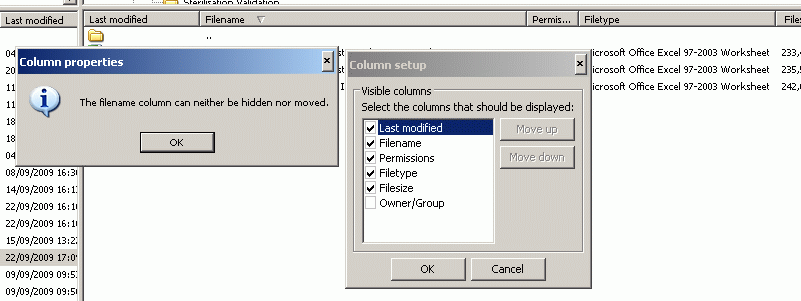
In the FTP window the Last Modified & Filename columns seem to have switched. The folder icons now show under the Last Modified column and I am unable to move the Filename column back to the left of the window where its default position should be.
When i go to column set-up by right clicking on the column headings; if I try to unselect the Last Modified column it returns the error "The Filename Column can neither be hidden nor removed".
I am also unable to move the Last Modified Column, it is fixed in the left side position (top of list in Column chooser).
I can move the Filename column down the list (in Column chooser window) but not back up to the first position; only to 2nd spot behind the Last Modified column.
Screenshot attached.
Attachments (1)
Change History (2)
by , 16 years ago
| Attachment: | Filezilla issue.gif added |
|---|
comment:1 by , 16 years ago
| Resolution: | → fixed |
|---|---|
| Status: | new → closed |
Will be fixed in the next version.
Please try the upcoming 2009-09-23 build from http://filezilla-project.org/nightly.php tomorrow.


Filename & Last Modified Conflict